Anonymous Email Service
Overview
Mailu includes an Anonymous Email Service (Anonmail) that generates random email aliases. The feature provides both a web interface and an API compatible with password managers like Bitwarden. The API follows the SimpleLogin model.
Features:
Random alias generation via admin UI or API
Optional hostname-based alias prefixes (e.g.
github.alpha@example.com)Per-domain access control
Administration
Domain configuration
Enable Anonymous Email Service in the domain settings. Each domain has an individual toggle. This enables the Anonmail feature for that domain for any user. Individual domain access can be granted in the domain access function by a domain manager or global admin.
Personal Alias management
The alias list displays Anonmail-generated aliases with additional metadata:
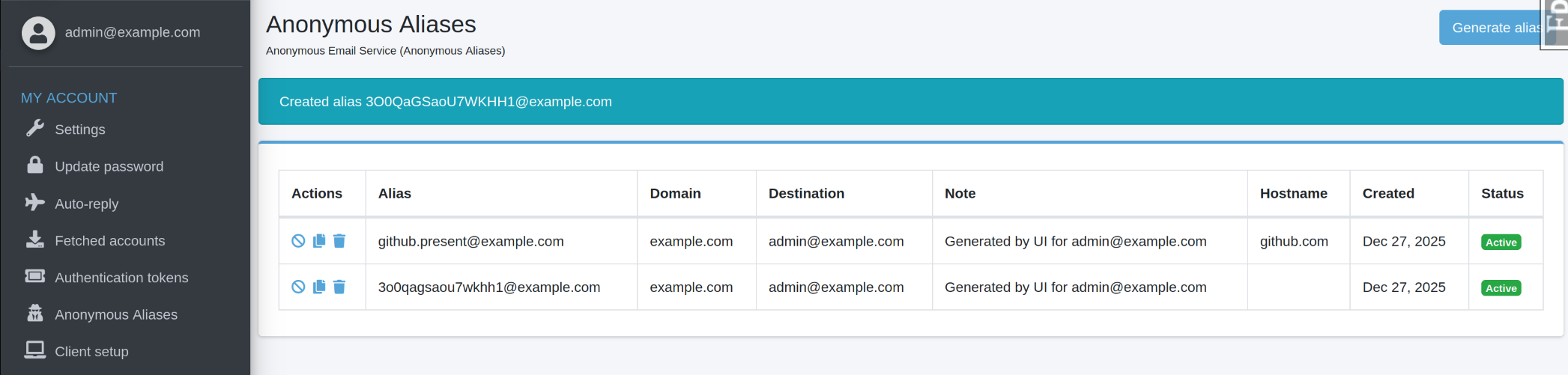
Aliases can be disabled or deleted directly from the interface.
API Usage
Authentication
Create a personal token under “Authentication tokens” in the admin
interface. The authentication header takes its TOKEN in the format of <user-email>:<auth-token>.
Requirements:
Valid application token
Anonmail enabled on target domain
Domain ownership or explicit access grant
Endpoint
POST /api/alias/random/new
Headers:
Authentication: <TOKEN>
Parameters:
hostname(query string, optional): Website hostname for alias prefix generationnote(JSON body, optional): Alias descriptiondestination(JSON body, optional): Forwarding address (string or array)
Example:
TOKEN="user-email:your-auth-token"
curl -X POST "https://admin.example.com/api/alias/random/new?hostname=www.github.com" \
  -H "Authentication: ${TOKEN}" \
  -H "Content-Type: application/json" \
  -d '{"note":"GitHub signup"}'
Response:
The API returns the created alias in JSON format.
Bitwarden Integration
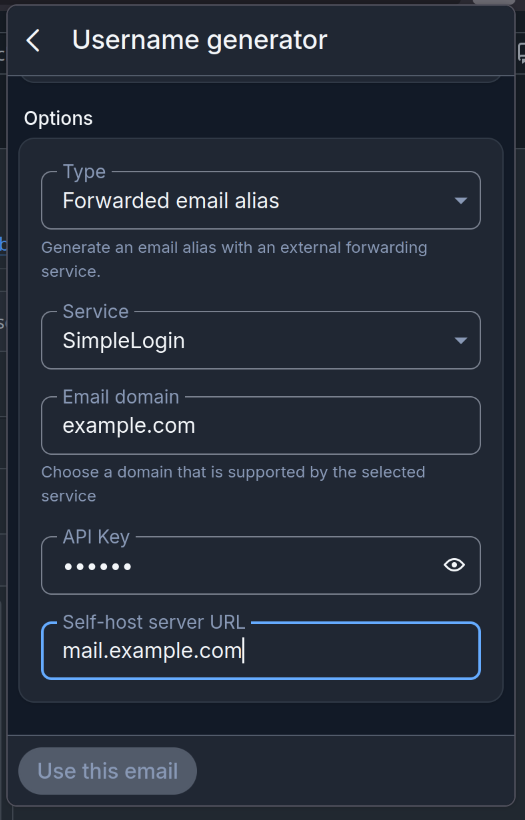
Integration with the Bitwarden password manager allows automatic alias generation during username creation.
Select “Forwarded email alias” as source for the username generator and supply an Email domain, your TOKEN, and the Mailu admin interface domain.
As seen below:
Behavior
Aliases created through Anonmail function as standard Mailu aliases. Incoming mail is forwarded to configured destination addresses. Disabling an alias stops mail delivery.
Destination addresses must belong to the token owner. Arbitrary forwarding addresses are not permitted.
Troubleshooting
- 403 / 401 errors
Verify token validity, domain Anonmail status, and access permissions.
- 404 errors
Confirm the domain has Anonmail enabled and the alias exists.
- Cannot create aliases
Check domain Anonmail status and domain access grants.
- Mail not delivered
Verify the alias is enabled and destination addresses exist in Mailu.